Inventory & Ordering Platform.
A product distribution platform where companies decide exactly who can order what — and how much they can spend.
- Products managed across the platform
- 8,000+
- Spending rules by category, subcategory, or individual item
- 3 levels
- Every team gets its own budget and product access
- Per-group limits
- Rules enforce themselves — no manual admin work
- Automatic
Overview
A product distribution platform where companies decide exactly who can order what — and how much they can spend. The rules apply automatically. No admin has to check, approve, or chase anything manually.
My Role
Full-stack developer
- Built the multi-step portal setup flow that lets vendors configure access rules without needing technical help
- Built the spending rules engine — limits apply at category, subcategory, and product level simultaneously
- Developed bulk product editing tools for managing large catalogs efficiently
Key Results
- Manual admin enforcement of product limits is gone — the platform handles it automatically across 8,000+ products
- Every team works within their budget and access permissions without oversight
- Business rules change without a development or database cycle
The Challenge
When a company shares products or a budget across multiple teams, someone always takes more than their share. Other teams get less than they need. Managers spend time policing what should be automatic.
The Solution
Built a platform where the company sets the rules once — which teams can order which products, and how much they can spend — and the system enforces everything from that point on. No team can exceed their limit. No team can see products they're not allowed to order. Nothing crosses between groups.
The Outcome
Manual admin enforcement of product limits is gone — the platform handles it automatically across 8,000+ products
Core Features
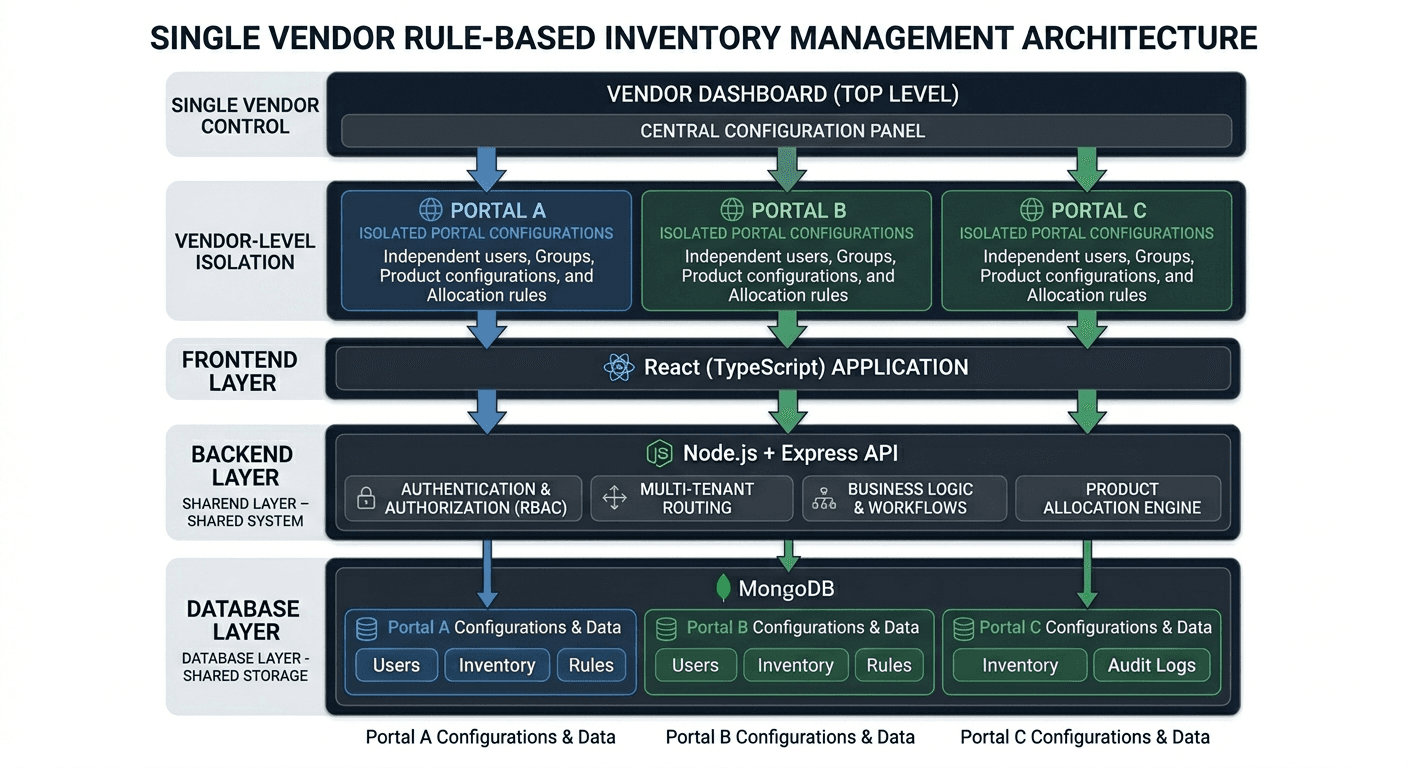
Multiple portals
each vendor or department gets its own configured environment
Spending limits by team, category, subcategory, or individual product
Each team only sees the products they're allowed to order
Automatic enforcement
limits apply without any admin involvement
Approval workflows
set orders to require sign-off, or allow open access
Flexible budget resets
monthly, yearly, or based on joining date
Tech Stack
What the system runs on, and the decisions behind each layer.
- Frontend
- React (TypeScript, complex multi-step form handling)
- Backend
- Node.js + Express (TypeScript)
- Database
- MongoDB
Impact
- Manual admin enforcement of product limits is gone — the platform handles it automatically across 8,000+ products
- Every team works within their budget and access permissions without oversight
- Business rules change without a development or database cycle